


Poll Everywhere is a popular tool for live polls and Q&A, but it does have limitations (for example, the free version caps polls at around 40 participants). Depending on your needs, other platforms might serve you better.
Below, we explore five great Poll Everywhere alternatives, each with its own strengths for different scenarios.
1. StreamAlive – Best for Live Virtual Training Sessions
If you’re a virtual instructor-led trainer, corporate facilitator, or educator, StreamAlive was built just for you. This platform focuses on turning passive online meetings into lively two-way conversations.
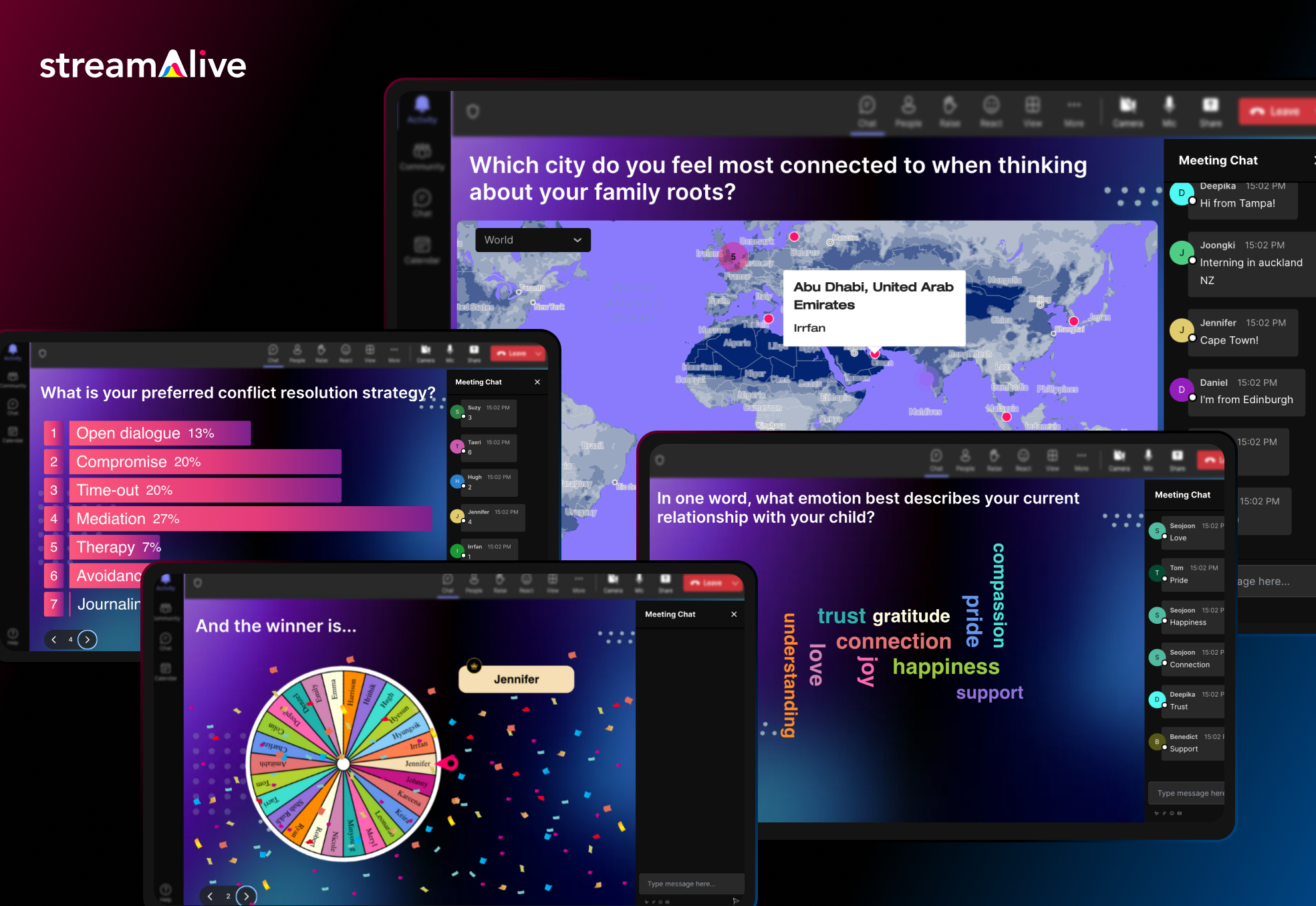
How? StreamAlive taps into the chat of your live session to power interactions. Participants don’t need to fumble with separate apps or QR codes, they simply type in the Zoom/Teams/Meet chat, and StreamAlive magically transforms those messages into live polls, word clouds, maps, or even a fun spinner wheel on your screen.
Participants don’t need a separate app or to scan a code, they just type responses in the chat, and StreamAlive instantly visualizes the input on screen as polls, word clouds, maps, or even fun spinner wheels.
In fact, StreamAlive works inside all major meeting platforms (Zoom, Microsoft Teams, Google Meet, YouTube Live, Twitch, even hybrid or in-person events) without extra links or QR codes, attendees just use the existing chat window.
Now you can also embed Streamalive interactions in presentation software like PowerPoint, Gamma, Google Slides, Miro, etc.
Here’s a sneak peek.
StreamAlive’s features are tailored to keep an online crowd awake and participating. You can run quizzes and polls, ask open-ended questions, visualize where people are from on a map, or spin a wheel to randomly pick a participant – awesome for keeping everyone on their toes. The platform even leverages AI to help presenters: it can summarize a flood of chat messages into key takeaways or highlight popular opinions in real-time. This is a lifesaver in long training sessions where the chat can explode with comments and you need to make sense of it all. The AI can also generate quirky visuals from the chat content, which adds a fun surprise element for your audience.
Pricing: StreamAlive offers a free plan for small sessions and simple try-outs (free for up to 10 learners/commenters per session). This is great if you want to test it in a small class or team meeting. As your audience grows, paid plans start at around $30 per month (or $150/year) which covers up to 100 active participants in a session. Higher tiers are available if you need to accommodate bigger groups or want enterprise features.
One nice thing is that pricing is based on how much you use its AI. Most sessions have fewer than 100 people which is covered in its Starter Plan. It’s how much you use the AI to generate new interactions (you can come up with your own interactions manually, so you don’t need to use the AI), how much you use the AI to summarize the chat (which is optional, so you could do dozens of sessions and not use the AI), and other interactions that use AI like the word clouds and Q&A feature.
StreamAlive is built to slot into your existing workflow. It has dedicated apps for PowerPoint so you can embed interactive slides like polls, word clouds, interactive maps, and spinner wheels directly in your existing PowerPoint deck.
It also has dedicated apps for Zoom and Teams that you can install to embed interactive activities directly into those platforms. But even without the app, you can just open StreamAlive in a browser alongside your presentation.
Because it reads the meeting chat, it’s compatible with virtually any virtual meeting software. Whether you’re screen-sharing a PowerPoint on Teams, teaching via Google Meet on a Chromebook, or live streaming on a Mac, StreamAlive has you covered.
The bottom line: for live online training sessions where you want maximum audience participation without disrupting the flow, StreamAlive is a powerful (and pretty neat) alternative to Mentimeter. It puts engagement on autopilot for the host, which is perfect if you love interactive sessions but don’t want the tech to get in the way of teaching.
2. Kahoot! – Gamified Quizzes for High-Energy Engagement
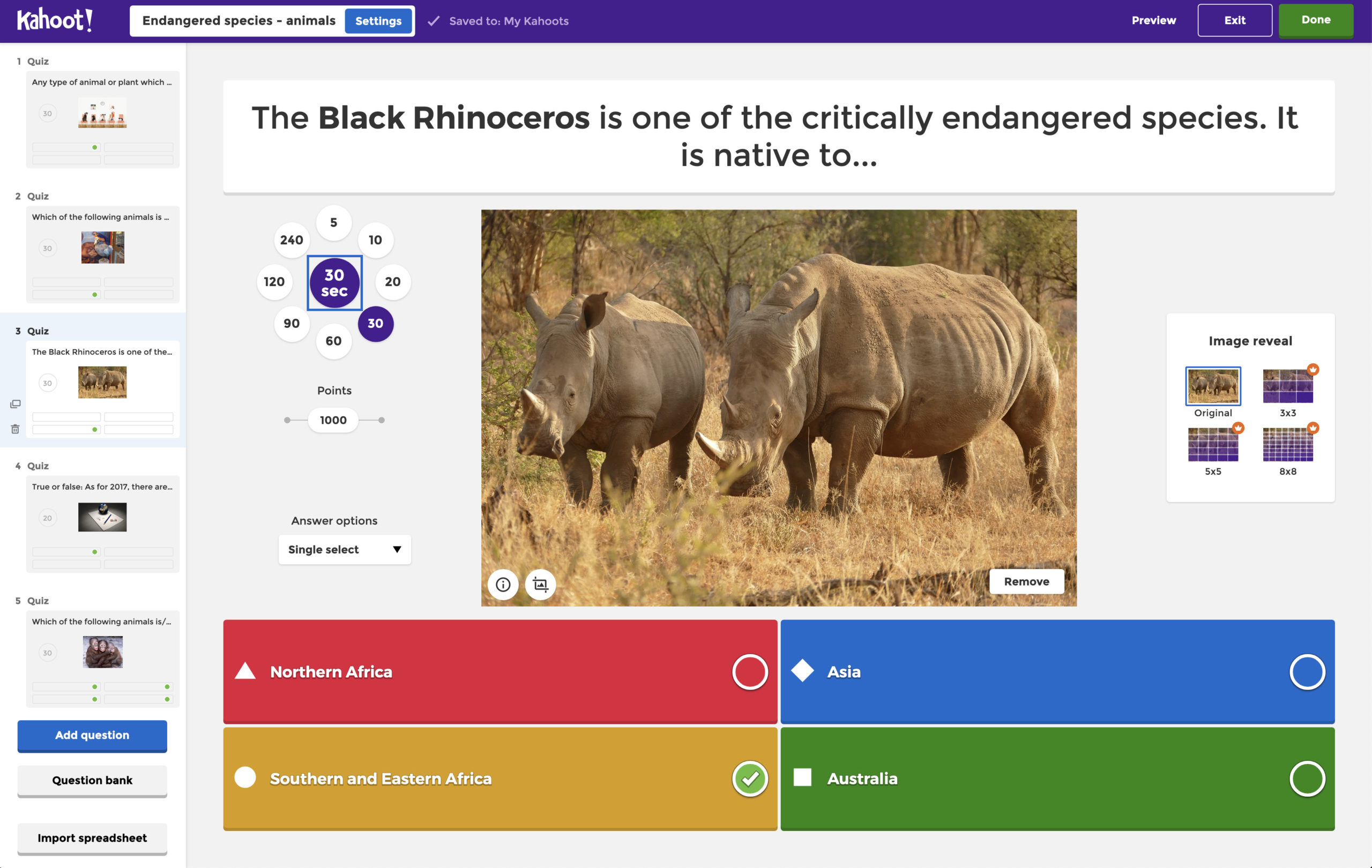
Kahoot! brings a game-show vibe to presentations. If you’ve ever seen a classroom erupt with excitement during a quiz, you know Kahoot’s power. It turns questions into a competitive quiz game with colorful graphics, countdown music, and leaderboards.
This playful approach makes it perfect for K-12 classrooms, trivia nights, or any group that would enjoy a bit of friendly competition in place of straightforward polls. Users can answer via their phones by entering a game PIN and tapping the answer shapes on their screen.
Kahoot gives multiple-choice quizzes, true/false questions, and polls presented in a fun, fast-paced format. It has a huge library of pre-made quizzes you can use or adapt. The downside is that the interface can feel a bit “childish” or restrictive; for example, answer choices are shown as colored shapes rather than text buttons. It’s less flexible for open-ended responses or detailed feedback, focusing more on right-or-wrong quiz questions.
Poll Everywhere supports quizzes and polls, but Kahoot! specializes in them as games. For teachers or presenters who want to energize the room (or Zoom) with a competitive quiz, Kahoot delivers an experience Poll Everywhere doesn’t quite match. It’s great for student engagement and quick knowledge checks. However, for serious corporate settings, Kahoot’s playful style might be less appropriate, so consider your audience.
Pricing: Kahoot! has a Basic free plan but it’s very limited; you can host Kahoots with up to 10 players for free. To involve larger groups, you’ll need a paid plan. For businesses, Kahoot! 360 plans start at roughly $17-19 per month for a host license (higher tiers allow more participants and add features). There are also education plans at discounted rates for teachers and schools. Keep in mind that some users find the subscription costs high for what you get, so be sure the gamification benefits are worth it for your needs.
3. Mentimeter – Versatile Interactive Presentations
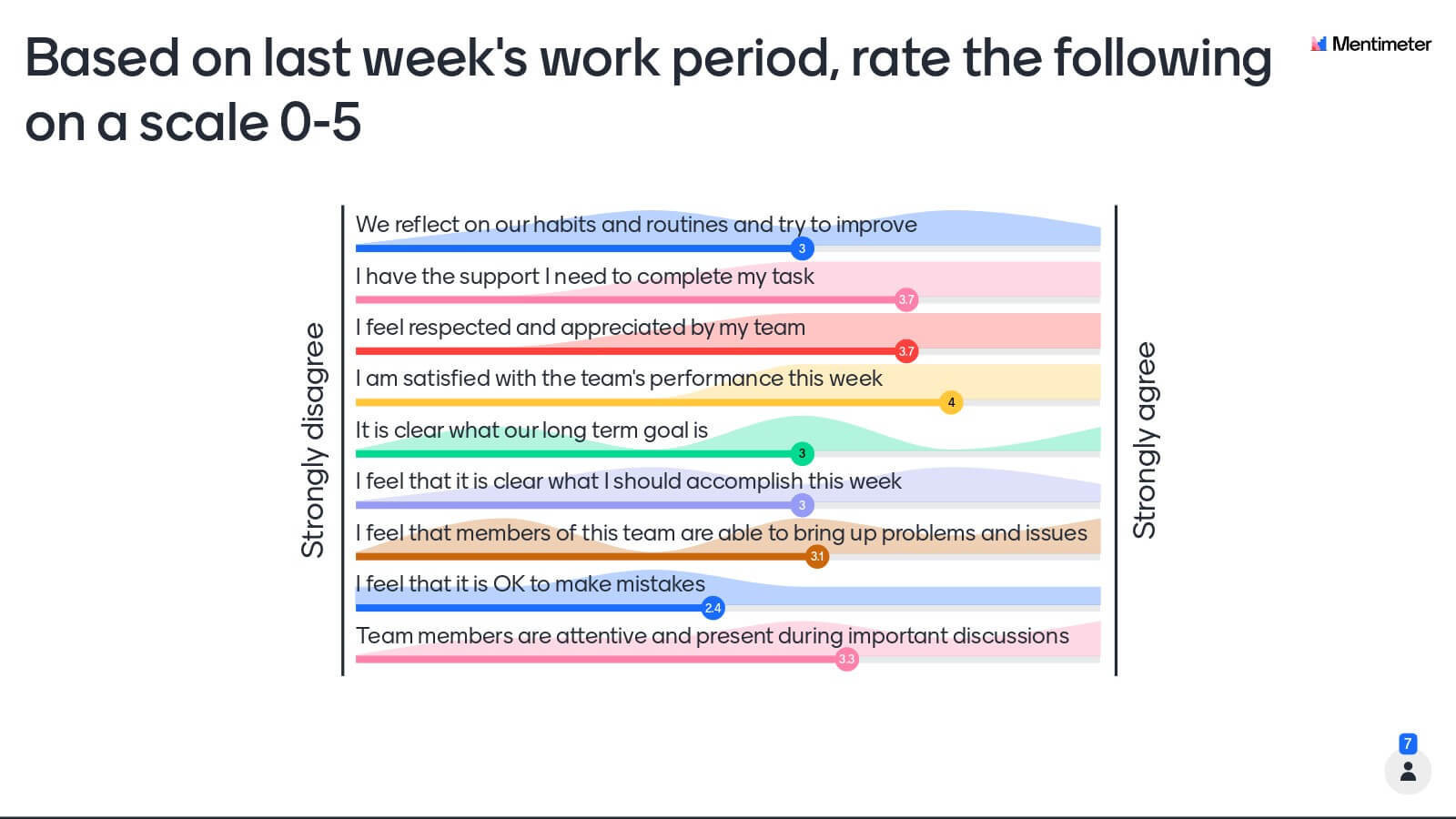
Mentimeter is a comprehensive tool for interactive presentations, well-loved in conference rooms and classrooms alike. With Mentimeter, you create a slide deck that can include live polls, multiple-choice questions, word clouds, scales, Q&A sessions, and more; and your audience can vote or submit responses from their phones in real time. It’s a bit like Poll Everywhere’s more feature-rich cousin: polished, professional, and packed with question types.
One of Mentimeter’s strengths is its variety. You can run quizzes with points, gather open-ended responses that display as word clouds, let people upvote questions in a Q&A, or even do quick surveys on a scale. It offers templates and themes which give presentations a clean, corporate look (which is why many business professionals gravitate to it). On the flip side, having so many features means Mentimeter can feel a little complex or “menu-heavy” at first. Still, it’s generally intuitive once you get the hang of it.
If Poll Everywhere feels too simple or limited for your needs, Mentimeter might be the upgrade. It’s especially useful when you want more than just basic polls, for example, interactive word clouds or a sequence of varied question slides within one presentation. Poll Everywhere tends to be straightforward and easy; Mentimeter offers a more robust feature set (with a steeper learning curve to match). It’s a great choice for workshops, all-hands meetings, or classes where you want multiple forms of interaction in one session.
Pricing: Mentimeter provides a free version that anyone can try. On the free plan, you can have an audience of up to 50 participants per month responding. (You read that right, Mentimeter counts unique voters per month on free accounts, which refreshes every 30 days.) The free version also now allows unlimited questions and slides in your presentation, but certain advanced question types or export options are reserved for paid users. Paid plans for individuals start at about $17.99 per month (Basic) and ~$24.99/month (Pro), unlocking features like larger audience sizes, data exports, and the ability to use your own branding. There are also educational discounts for teachers and students. If you have a big conference or need enterprise features (SSO, collaboration, etc.), enterprise plans are available too.
4. Slido – Q&A and Polling for Events and Meetings
Slido has made a name for itself as the go-to tool for live Q&A and polling in conferences, webinars, and company meetings. In fact, if you’ve ever been at a tech conference or all-hands meeting where attendees submit questions on their phones and vote them up, there’s a good chance Slido was running behind the scenes. Now part of Cisco, Slido integrates nicely with presentation tools (there’s a PowerPoint add-in) and video platforms like Webex and Zoom. Its strength lies in handling Q&A at scale and keeping audiences engaged with multiple poll types.
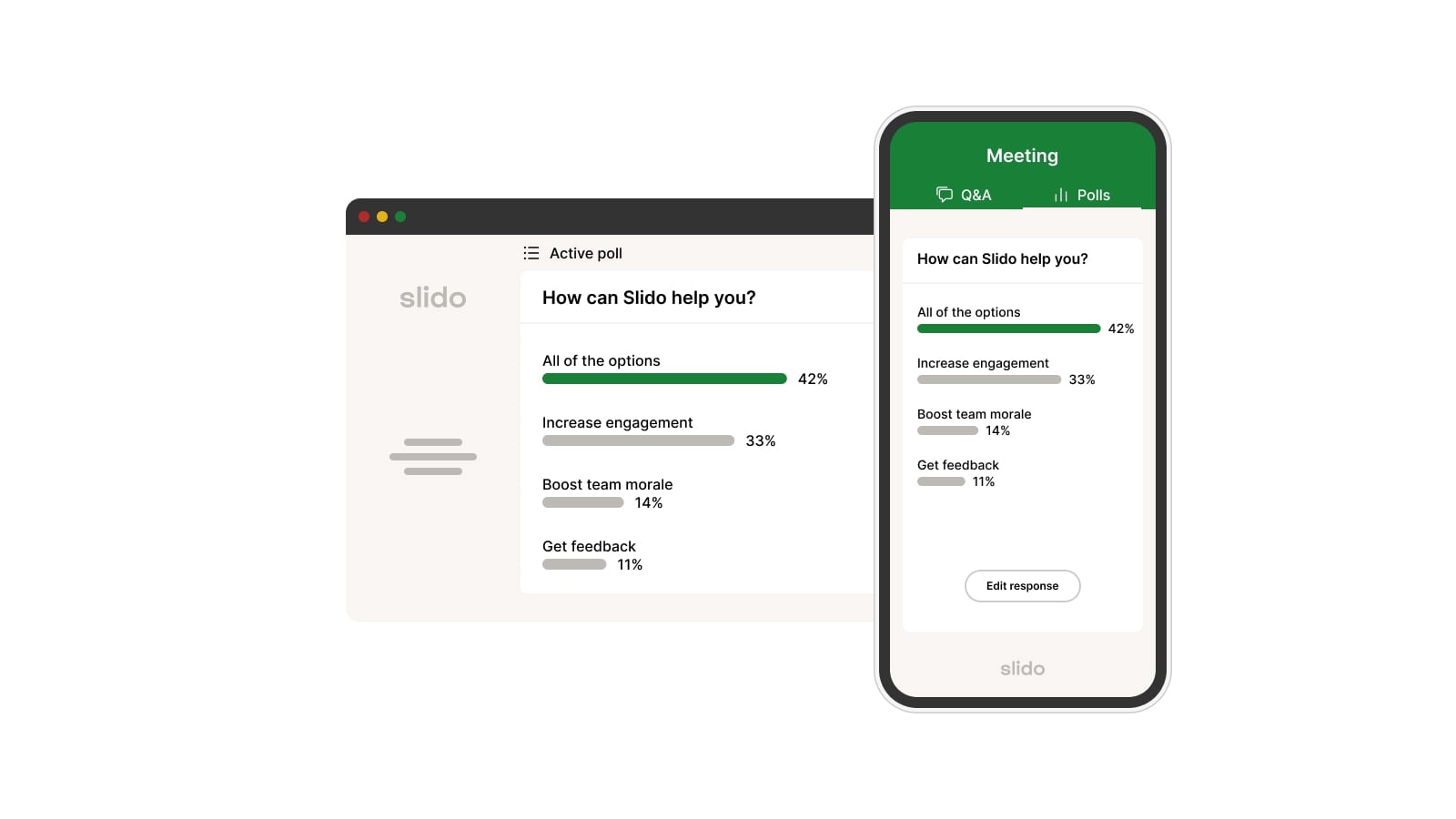
Slido supports live polls (multiple choice, word clouds, quizzes, rating scales, etc.), but its standout feature is audience Q&A. Participants can submit questions anonymously and upvote others’ questions, which is fantastic for large audiences where you want the most pressing questions to rise to the top. Moderation tools help presenters manage which questions to display (to avoid any embarrassing ones). Slido’s interface for participants is a simple web link or integration, they just join and see the current activity or Q&A. For presenters, Slido now offers analytics too (so you can review engagement data after your event).
Poll Everywhere also has Q&A and polling, but Slido is often praised for doing it in a more streamlined way for big events. For example, Poll Everywhere free maxes out at relatively small audience sizes, whereas Slido is built to handle thousands of participants smoothly. If you’re running a town hall, conference panel, or large meeting and need robust Q&A management, Slido likely edges out Poll Everywhere. It’s also a good choice if you want an interactive element in your presentation without requiring any installs, participants have to use a link or QR code to join in.
Pricing: Slido offers a generous free plan: you can host sessions with up to 100 participants and you get unlimited Q&A plus up to 3 polls and 1 quiz per event on the free tier. This is often enough for smaller team meetings or classes. For larger events or more advanced needs, the Engage plan is about $17.50 per month and raises the limit to 200 participants with unlimited polls/quizzes. Above that, Slido’s Professional plan (around $75/mo) allows 1,000 participants and adds features like moderated Q&A and branding. Enterprise plans can go up to 5,000 participants or more. One nice thing: Slido’s PowerPoint integration is free for anyone to use, which means you can embed live polls in your slides easily.
5. AhaSlides – Interactive Presentation Tool with Great Value
AhaSlides is a rising star in the audience engagement space, often described as a more affordable alternative to Mentimeter. It lets you create interactive presentations with slides for polls, quizzes, word clouds, Q&A sessions, and more. The vibe of AhaSlides is a bit more fun and informal, the interface feels fresh and the learning curve is gentle. They also provide a ton of templates, which is helpful if you’re not sure how to set up your interactive slides. For those on a tight budget (like teachers or small teams), AhaSlides can deliver a lot of functionality for a lower cost than some competitors.
With AhaSlides you can do many of the same things as Poll Everywhere or Mentimeter: ask your audience questions and see results live. This includes multiple-choice polls, open-ended questions (displayed as word clouds or message lists), quizzes with leaderboards, rating scales, and more. AhaSlides has a nifty feature called “spinner wheel” as well, which is a fun way to randomly pick a winner or select a topic, great for giveaways or choosing Q&A questions randomly. The platform emphasizes being user-friendly, and many users find its slide editor more intuitive or “friendly” compared to some older tools. It might not have every single advanced option, but it covers all the basics for interactive presentations.
AhaSlides positions itself as a straightforward, cost-effective alternative to Poll Everywhere and Mentimeter. If Poll Everywhere feels too limited (or too pricey for what it offers) and Mentimeter feels too complex or expensive, AhaSlides could hit a sweet spot. It supports much larger audience sizes on its higher plans (up to 10,000 participants on certain plans), which dwarfs Poll Everywhere’s typical limits. It’s a good choice for educators, trainers, or event hosts who want a full-featured audience engagement tool without breaking the bank.

Pricing: AhaSlides has a free plan that you can use indefinitely. Free accounts let you host events with up to 50 live participants and include all slide types (however, you’re limited to 5 quiz questions and 3 poll questions per presentation on free). What’s great is there’s no monthly participant cap, you can run as many sessions as you want, as long as each session has 50 or fewer people. When you need more capacity or slides, the paid plans are quite affordable. The Essential plan is about $7.95 per month and raises the limit to 100 participants, with no limits on the number of questions you can add. The Pro plan (around $15.95/mo) allows an unlimited audience size and adds advanced features for big events. There are also special educational plans with discounts for schools. Compared to other platforms, AhaSlides is indeed one of the lowest-cost options for the features it offers.


.svg.png)


